
Microsoft Officially Launches Office For Android Phone

Microsoft this morning announced the official launch of Office for Android phone, five weeks after the company rolled out the suite of applications as a preview. 
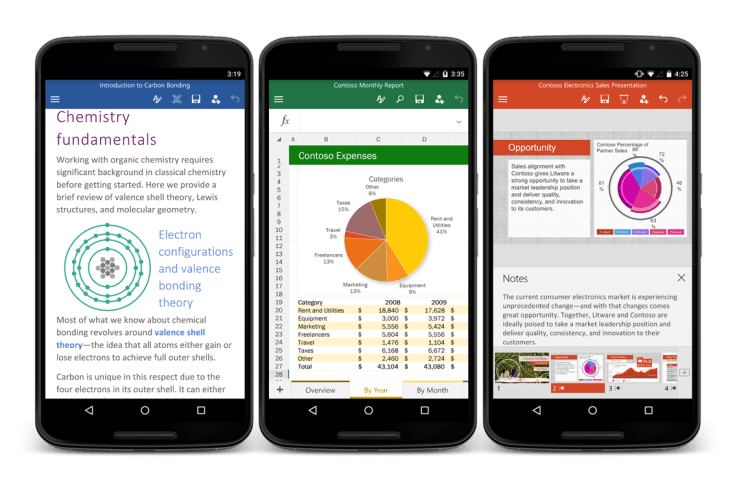
 Today’s release, which includes Word, Excel and PowerPoint designed for the Android smartphone experience, follows earlier efforts at bringing Office to Android tablets, as well as support for Office on iOS devices, Windows and OS X.

The Office apps offer support for a variety of common tasks, including the ability to review and edit files while on the go, presenting PowerPoint presentations from your phone, and quickly pulling up documents even when they’re stored on competing services like Google Drive, Dropbox or Box. The apps, which will replace the older Office Mobile, require 1 GB of RAM and Android KitKat (4.4.x) or above. Android M is not yet supported.

The apps are free to use provided you have a free Microsoft account, but a number of extra features aimed at power users can be unlocked with an Office 365 subscription.

The apps will also be pre-installed on devices from over 30 OEMs, including Samsung, LG, Sony, and others, the company notes. Many of these devices will arrive in retail stores later in the year.

However, users don’t have to wait for their own handset to come with Office pre-loaded – the apps are now available to the public for download. Word for Android, Excel for Android and PowerPoint for Android are live now on Google Play, and in China, they’re available on a number of alternative app stores, including those from Tencent, Baidu, Xiaomi, and CMCC. The Samsung Galaxy Store also offers others around the world access to download.

According to Microsoft, preview testers ran the Office for Android phone apps on over 1,900 different phone models in 83 countries, which allowed the company to incorporate their feedback into the versions out today. Testers’ feedback not only helped the company troubleshoot bugs, but Microsoft also made adjustments to the user interface and added features, it says. For instance, the Office for Android phone apps now connect to third-party storage services including Google Drive and Box, and Microsoft implemented usability adjustments to make it easier to navigate commands within the apps.

The release represents yet another move by Microsoft to fully embrace its cross-platform strategy when it comes to its software. Office was once tied largely to Windows PCs, but the company today is working to make sure its flagship productivity suite works anywhere its users are – even on competitors’ OS’s. The strategy seems to be succeeding at putting Office in the hands of a large audience – in April of this year, the company said its iOS and Android downloads combined had topped 100 million.

Popular posts from this blog

Nothing Phone 2: There's something in marketing gimmick

Nothing Phone 2 Squabble: Nothing priced its first phone (Nothing Phone) at 32,000 on July 12, 2022. The phone was distinct because to its glyph light feature and distinctive operating system. Nothing has also developed Nothing EAR (TWS), a Landon-based firm that has sold over 1 million units worldwide as of the end of 2022. Here is our whole Nothing Phone 2 review. Carl Pei, CEO of Nothing Nothing Technology Limited (stylized as NOTHING), has introduced Nothing Phone 2, and people are discussing his marketing techniques rather than his products. They implement a twofold embargo for artists; it appears that they are encouraging influencers to engage in dark marketing. Mr. Rakesh, alias Gyan Therapy, made a video opposing the embargo while everyone else was busy fluffing it.  So, following the contentious embargo, I've discovered two major reasons to avoid Nothing Phone 2: 1. Expensive Pricing: The Nothing Phone 2 costs roughly 45,000 INR, which is 5,000 INR higher than the Oneplus ...

dark mode youtube android YouTube Vanced

This is a step bu step guide on how to get dark mode on YouTube android app. By using dark mode you can save more battery if you smartphone display is Amoled, along with that you can also get some features like Picture in Picture, and built in Ad Blocking too. Note:- You need to install and apk get this feature work. Install at your own risk. Some feature may need specific android version to work. It wont replace the stock YouTube android app. See Also:- Get Dark Mode on YouTube Android  P Based Pixel Launcher for any Android Device Video Demo:- Check out the video description before and see all the features on this, before you try and install it. Files Needed:- You may need to install following set of files. Also keep an eye on this link  to get the updated file. Micro G Vanced (For Google Sign In) YouTube Vanced (With Black Theme) Steps to Follow:- You need to install the YouTube vanced apk from the link above and optionally you can i...

pokemon go android 0.57.2 hack download

This post will guide you on how you can play the latest version of Pokemon GO (0.57.2) on your Android device. With the new update there are lot of new features and changes have been made. The new version looks very different and exciting comparing to older pokemon go versions. Note: This guide is for educational and knowledge purpose only. Try at your own risk. Neither the author the Niantic is suggesting to use the hack on the games. There may be actions taken if you been caught by Niantic. See Also Simplest Trick to Increase Reliance JIO 4G Speed Battery Drain Fix for OnePlus 3 & OnePlus 3T Always On Display for any Android Whats New in Version 0.57.2 According to  Official Niantic Blog Post , Here are the new features and changes Over 80 additional Pokémon originally discovered in the Johto region can be caught. Gender-specific variations of select Pokémon can be caught. Added new encounter mechanics. Added Poké Ball and Berry selec...